# Raspberry Pi setup
## Bake OS
Download the Raspberry Pi imager from [https://www.raspberrypi.com/software/](https://www.raspberrypi.com/software/) and install write the OS on your SD card.
1\. Select: Raspberry Pi OS Lite (64-bit) [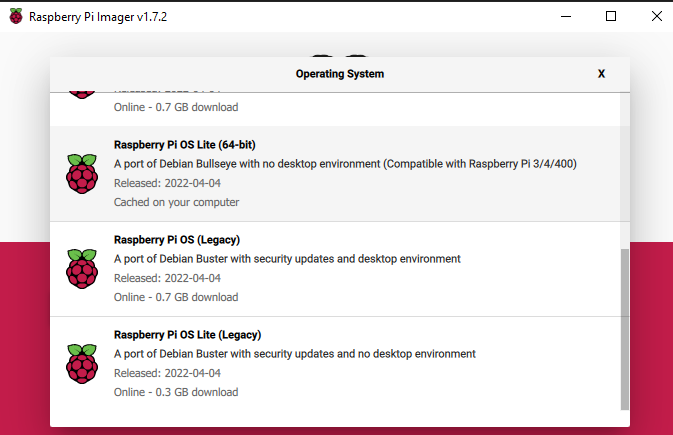](https://wiki.togogo.ch/uploads/images/gallery/2022-07/8X6image.png)
2\. Select the SD card as Storage device
3\. Define the hostname and enable SSH
[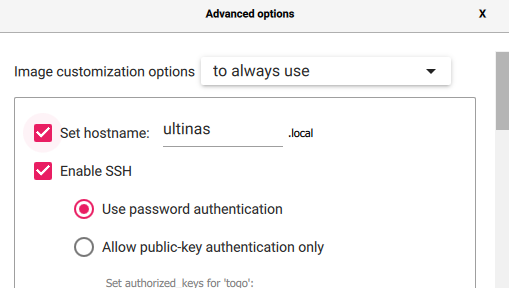](https://wiki.togogo.ch/uploads/images/gallery/2022-07/sXyimage.png)
4\. Enter your credentials which you want to login later
[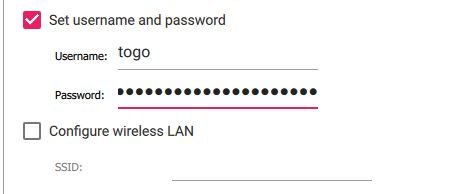](https://wiki.togogo.ch/uploads/images/gallery/2022-07/7jhimage.png)
5\. If you are not via LAN connected you can configure the Wifi as well in the setting.
6\. Execute it! After that stick the SD card into the Raspberry Pi and power it on.
## Connect via SSH
### Windows
Download [https://www.advanced-ip-scanner.com/de/](https://www.advanced-ip-scanner.com/de/) and scan your network. You'll see the IP address and hostname.
Connect with putty [https://www.putty.org/](https://www.putty.org/) or use WSL (Windows Subsystem for Linux) [https://docs.microsoft.com/de-de/windows/wsl/install](https://docs.microsoft.com/de-de/windows/wsl/install)
Enter `ssh username@192.168.1.222` and provide your password
### MAC / Linux
Open the terminal and scan the network with NMAP.
```
nmap -sn 192.168.1.0/24
```
Then enter `ssh username@192.168.1.222` and provide your password
## Install OMV
First of all make sure your Raspi is updated and upgraded.
```
sudo apt update
sudo apt upgrade
```
Afterwards download the OMV install script.
```
wget -O - https://raw.githubusercontent.com/OpenMediaVault-Plugin-Developers/installScript/master/install | sudo bash
```
The installation takes a while. To make sure your files were downloaded enter following:
```
dpkg -l | grep openme
```
That was it already now enter the IP of your Raspberry Pi in your browser.