
Nessus
Nessus vulnerability scanner is exactly what you think is it’s! A vulnerability scanner!
It uses techniques similar to Nmap to find and report vulnerabilities, which are then, presented in a nice GUI for us to look at.
Nessus is different from other scanners as it doesn't make assumptions when scanning, like assuming the web application is running on port 80 for instance.
Installation on Kali
- Goto https://www.tenable.com/products/nessus/nessus-essentials and register an account.
- Download the Nessus-X.XX.X-debian6_amd64.deb
- Depends which OS you are using
- Navigate to the directory where it was downloaded
- Run following command: sudo dpkg –I Nessus-X.XX.X-debian6_amd64.deb
- Once it’s installed start the service: sudo /bin/systemctl start nessusd.service
- Open https://localhost:8834 in the browser. Accept the risk alert and continue.
- On the welcome screen select Nessus Essentials
- If you already have an account you can skip the account creation.
- Now enter the activation code which you received via email.
- Create a user account.
- Nessus will start now downloading the plugins. This takes some time check that you have enough space!
- After the plugins were downloaded you can log in with your recently created user account.
Usage
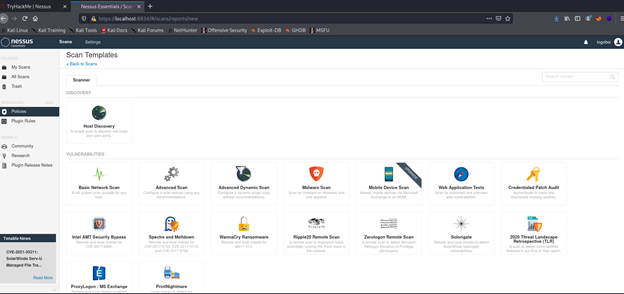
As soon Nessus is installed you can enter the Web-UI. In general it’s simple to create scans as there are many prepared templates. In each scan you can set different parameters to adjust the scan.
No Comments