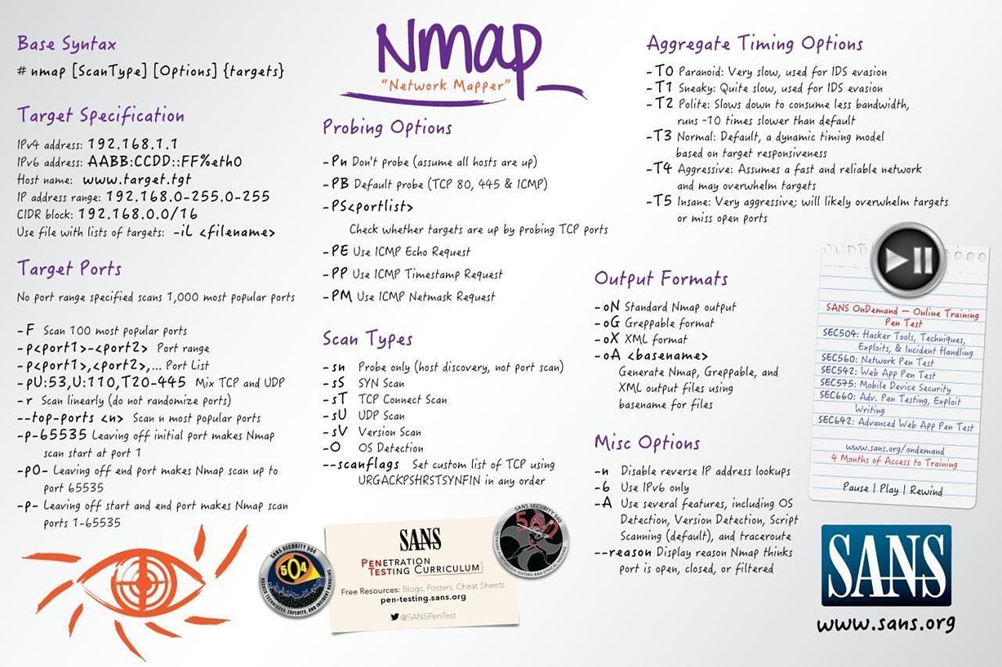
NMAP
NMAP in general
NMAP is a free open source “Network Mapper” for network exploration or security auditing. You define an IP address which you want to scan and NMAP will list you all open accessible ports and more. This tool has so many options to scan an environment I will list the most common and useful.
Additionally I explain the most important ones.
Scan Types
When port scanning with Nmap, there are three basic scan types. These are:
- TCP Connect Scans (-sT)
- SYN "Half-open" Scans (-sS)
- UDP Scans (-sU)
Additionally there are several less common port scan types, some of which we will also cover. These are:
- TCP Null Scans (-sN)
- TCP FIN Scans (-sF)
- TCP Xmas Scans (-sX)
Most of these (with the exception of UDP scans) are used for very similar purposes, however, the way that they work differs between each scan.
TCP Scan
To understand TCP Connect scans (-sT), it's important that you're comfortable with the TCP three-way handshake.
In other words, if Nmap sends a TCP request with the SYN flag set to a closed port, the target server will respond with a TCP packet with the RST (Reset) flag set. By this response, Nmap can establish that the port is closed.
If, however, the request is sent to an open port, the target will respond with a TCP packet with the SYN/ACK flags set. Nmap then marks this port as being open (and completes the handshake by sending back a TCP packet with ACK set).
Many firewalls are configured to simply drop incoming packets. Nmap sends a TCP SYN request, and receives nothing back. This indicates that the port is being protected by a firewall and thus the port is considered to be filtered.
SYN Scan
As with TCP scans, SYN scans (-sS) are used to scan the TCP port-range of a target or targets; however, the two scan types work slightly differently. SYN scans are sometimes referred to as "Half-open" scans, or "Stealth" scans.
They require sudo permissions in order to work correctly in Linux. This is because SYN scans require the ability to create raw packets (as opposed to the full TCP handshake), which is a privilege only the root user has by default.
If a port is closed then the server responds with a RST TCP packet. If the port is filtered by a firewall then the TCP SYN packet is either dropped, or spoofed with a TCP reset.
UDP Scan
Unlike TCP, UDP connections are stateless. This means that, rather than initiating a connection with a back-and-forth "handshake", UDP connections rely on sending packets to a target port and essentially hoping that they make it.
When a packet is sent to an open UDP port, there should be no response. Nmap refers to the port as being open|filtered. In other words, it suspects that the port is open, but it could be firewalled.
UDP scans tend to be incredibly slow in comparison to the various TCP scans. For this reason it's usually good practice to run an Nmap scan with --top-ports <number> enabled.
NULL, FIN and XMAS Scan
As the name suggests, NULL scans (-sN) are when the TCP request is sent with no flags set at all. As per the RFC, the target host should respond with a RST if the port is closed.
FIN scans (-sF) work in an almost identical fashion; however, instead of sending a completely empty packet, a request is sent with the FIN flag (usually used to gracefully close an active connection). Once again, Nmap expects a RST if the port is closed.
As with the other two scans in this class, Xmas scans (-sX) send a malformed TCP packet and expects a RST response for closed ports. It's referred to as an xmas scan as the flags that it sets (PSH, URG and FIN) give it the appearance of a blinking christmas tree when viewed as a packet capture in Wireshark.
The expected response for open ports with these scans is also identical, and is very similar to that of a UDP scan. If the port is open then there is no response to the malformed packet.
Common Scans
The most common commands are following:
nmap –sV <ip.of.vic.tim>
nmap –v -A <ip.of.vic.tim>
sudo nmap -sV -sC --script vuln -oN <outfile> <ip.of.vic.tim>
There are a lot more commands which are very powerful:
https://securitytrails.com/blog/top-15-nmap-commands-to-scan-remote-hosts
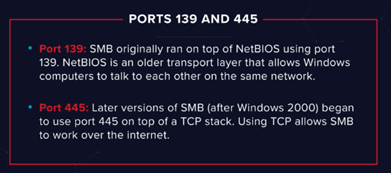
SAMBA Enumeration with NMAP
During the scanning process you will check for the samba shares. NMAP is a very helpful tool.
nmap -p 445 --script=smb-enum-shares.nse,smb-enum-users.nse MACHINE_IP
This command will list you up all available shares in the target network with additional information as Workgroup, User and so on.
When you don’t have success try to check another port.
To connect to a SMB share you type following:
smbclient //ip/folder
Create a MAP of the network
On first connection to a target network in a black box assignment, our first objective is to obtain a "map" of the network structure -- or, in other words, we want to see which IP addresses contain active hosts, and which do not.
To perform a ping sweep, we use the -sn switch in conjunction with IP ranges which can be specified with either a hyphen  or CIDR notation. i.e. we could scan the 192.168.0.x network using:
nmap -sn 192.168.0.1-254
OR
nmap -sn 192.168.0.0/24
NSE Scripts
The Nmap Scripting Engine (NSE) is an incredibly powerful addition to Nmap, extending its functionality quite considerably.
There are many categories available. Some useful categories include:
- safe:- Won't affect the target
- intrusive:- Not safe: likely to affect the target
- vuln:- Scan for vulnerabilities
- exploit:- Attempt to exploit a vulnerability
- auth:- Attempt to bypass authentication for running services (e.g. Log into an FTP server anonymously)
- brute:- Attempt to bruteforce credentials for running services
- discovery:- Attempt to query running services for further information about the network (e.g. query an SNMP server).
A more exhaustive list can be found here.
Working with NSE Scripts
The --script switch to activate NSE scripts from the vuln category using --script=vuln. It should come as no surprise that the other categories work in exactly the same way.
If the command --script=safe is run, then any applicable safe scripts will be run against the target (Note: only scripts which target an active service will be activated).
To run a specific script, we would use
--script=<script-name> , e.g. --script=http-fileupload-exploiter
Multiple scripts can be run simultaneously in this fashion by separating them by a comma. For example:
--script=smb-enum-users,smb-enum-shares
Some scripts require arguments (for example, credentials, if they're exploiting an authenticated vulnerability). These can be given with the --script-args Nmap switch.
For example:
nmap -p 80 --script http-put --script-args http-put.url='/dav/shell.php',http-put.file='./shell.php'
Note that the arguments are separated by commas, and connected to the corresponding script with periods (i.e. <script-name>.<argument>)
Nmap scripts come with built-in help menus, which can be accessed using
nmap --script-help <script-name>
Searching for NSE Scripts
Ok, so we know how to use the scripts in Nmap, but we don't yet know how to find these scripts. We have two options for this, which should ideally be used in conjunction with each other. The first is the page on the Nmap website which contains a list of all official scripts.
The second is the local storage on your attacking machine. Nmap stores its scripts on Linux at /usr/share/nmap/scripts. All of the NSE scripts are stored in this directory by default
There are two ways to search for installed scripts. One is by using the /usr/share/nmap/scripts/script.db file.
Example:
grep "ftp" /usr/share/nmap/scripts/script.db
The second way to search for scripts is quite simply to use the ls command.
Example:
ls -l /usr/share/nmap/scripts/*ftp*
RPC Bind
Rpcbind is just a server that converts remote procedure call (RPC) program number into universal addresses. When an RPC service is started, it tells rpcbind the address at which it is listening and the RPC program number it’s prepared to serve.
In our case, port 111 is access to a network file system. Let’s use NMAP to enumerate this.
nmap -p 111 --script=nfs-ls,nfs-statfs,nfs-showmount MACHINE_IP
Now we see which mount is used.
Firewall Bypassing
We have already seen some techniques for bypassing firewalls (think stealth scans, along with NULL, FIN and Xmas scans). But there is also another trick. Your typical Windows host will, with its default firewall, block all ICMP packets.
So, we need a way to get around this configuration. Fortunately Nmap provides an option for this: -Pn, which tells Nmap to not bother pinging the host before scanning it.
Its worth to know that if you're already directly on the local network, Nmap can also use ARP requests to determine host activity.
There are a variety of other switches which Nmap considers useful for firewall evasion. More here.
- -f: Used to fragment the packets (i.e. split them into smaller pieces) making it less likely that the packets will be detected by a firewall or IDS.
- Alternative to –f change size of the packets: --mtu <number> ->This must be a multiple of 8.
- --scan-delay <time>ms:- used to add a delay between packets sent. This is very useful if the network is unstable
- --badsum:- this is used to generate in invalid checksum for packets. Any real TCP/IP stack would drop this packet, however, firewalls may potentially respond automatically.NMAP
CheatSheet