
Preparation and Requirements
In UBS I'm managing a course for apprentices inside UBS. As we are working in the IT Security we are presenting how the work is done in several teams.
Splunk is an well known application in UBS and is needed everyday. Splunk is logging everything what happens in the network. In my course for the event we are playing a CTF with Splunk.
Preparation and Information
CTF Scoreboard:
https://github.com/splunk/SA-ctf_scoreboard
Splunk Dataset:
https://github.com/splunk/botsv1
Splunk installation:
https://docs.splunk.com/Documentation/Splunk/7.0.3/Installation/InstallonLinux
Splunk Download:
https://www.splunk.com/de_de/download/splunk-enterprise.html
CentOS Download:
https://www.centos.org/download/
Setting up VM
First download the CentOS 8 iso file so we can start setup a VM.
http://mirror.init7.net/centos/8.4.2105/isos/x86_64/CentOS-8.4.2105-x86_64-dvd1.iso
As soon you downloaded the iso we can start with VirtualBox.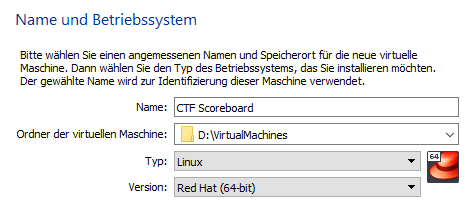
Set the RAM to ca. 4GB: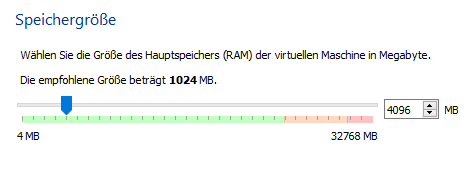
Create a dynamic VDI Disk with ca. 20-25 GB: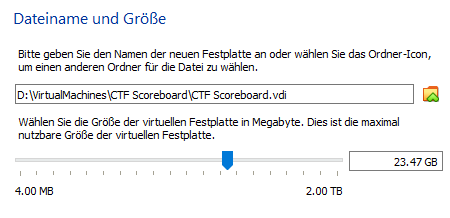
Now the VM is ready to start but we need to specify some settings.
First we set the clipboard to bidirectional mode: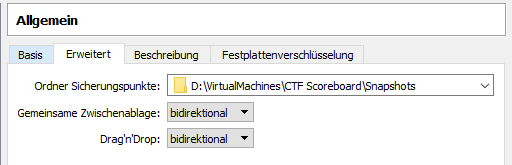
Upscale the processor to minimum 2 cores: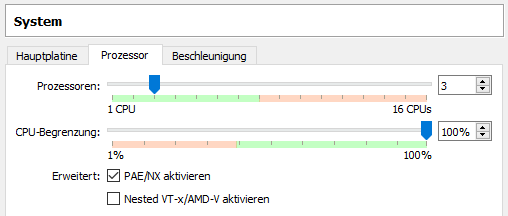
Then change the network adapter to the Network bridge: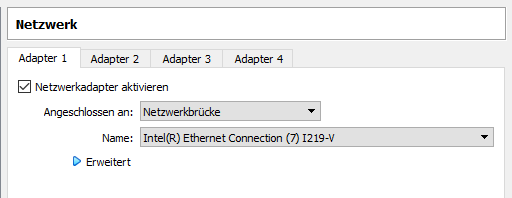
And finally add the ISO File to the storage: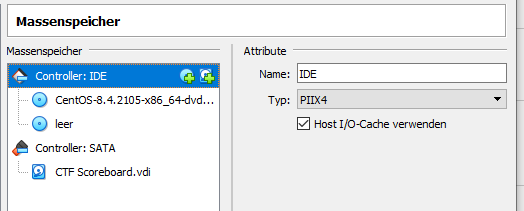
Now we can start the machine and configure the setup.