
LFI - Local File Inclusion
An LFI vulnerability is found in various web applications. As an example, in the PHP, the following functions cause this kind of vulnerability:
- include
- require
- include_once
- require_once
What is the risk of LFI?
Once you find an LFI vulnerability, it is possible to read sensitive data if you have readable permissions on files. Thus, one of the most significant risks is leaking sensitive data accessed by a regular user. Also, in some cases, an LFI vulnerability could be chained to perform Remote Code Execution RCE on the server. If we can inject or write to a file on the system, we take advantage of LFI to get RCE.
Identifying and testing for LFI
Usually, attackers are interested in HTTP parameters to manipulate the input and inject attack payloads to see how the web application behaves. In general, if you are looking for an entry point to test web application attack types, then it is important to use the web app and check its functionalities. An entry point could be HTTP GET or POST parameters that pass an argument or data to the web application to perform a specific operation.
Parameters are query parameter strings attached to the URL that could be used to retrieve data or perform actions based on user input. The following graph explains and breaks down the essential parts of the URL.

For example, parameters are used with Google searching, where GET requests pass user input into the search engine.
https://www.google.com/search?q=TryHackMe
Once you find an entry point, we need to understand how this data could be processed within the application. After this point, you can start testing for certain vulnerability types using manual or automated tools. The following is an example of PHP code that is vulnerable to LFI.
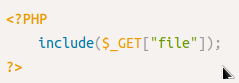
The PHP code above uses a GET request via the URL parameter file to include the file on the page. The request can be made by sending the following HTTP request: http://example.thm.labs/index.php?file=welcome.txt to load the content of the welcome.txt file that exists in the same directory.
In addition, other entry points can be used depending on the web application, and where can consider the User-Agent, Cookies, session, and other HTTP headers.
Now that we found our entry point, let's start testing for reading local files related to the operating system. The following are some Linux system files that have sensitive information.
/etc/issue
/etc/passwd
/etc/shadow
/etc/group
/etc/hosts
/etc/motd
/etc/mysql/my.cnf
/proc/[0-9]*/fd/[0-9]*   (first number is the PID, second is the filedescriptor)
/proc/self/environ
/proc/version
/proc/cmdline
Let's start with basic testing of LFI. Once we identify the entry point or the HTTP parameter, we can begin testing and include OS files to see how the web application reacts. As a test case, we can always try /etc/passwd against Linux OS since it is readable for sure. We can also try to include using different techniques such as
- A direct file inclusion, which starts with /etc/passwd
- using .. to get out the current directory, the number of .. is varies depending on the web app directory.
- Bypassing filters using ....//.
- URL encoding techniques (such as double encoding)

Exploiting LFI
Exploiting an LFI sometimes is limited and depends on the web application server configuration. Besides reading sensitive data, often, we can obtain remote code execution. If we are dealing with a PHP web application, then we can use a PHP-supported Wrapper. For more information, visit the PHP manual page. PHP provides various methods of transmission of data (Input/Output stream) to allow PHP to read from. It will enable reading data via various data type channels.
PHP Filter
The PHP filter wrapper is used in LFI to read the actual PHP page content. In typical cases, it is not possible to read a PHP file's content via LFI because PHP files get executed and never show the existing code. However, we can use the PHP filter to display the content of PHP files in other encoding formats such as base64 or ROT13.
Let's try first reading the /etc/passwd file using the PHP filter wrapper.

Now try to read the index.php file using a PHP filter; we get errors because the web server tries to execute the PHP code. To avoid this, we can use a PHP filter while base64 or ROT13 encoding the output as follows:

No Comments