
Raspberry Pi setup
Bake OS
Download the Raspberry Pi imager from https://www.raspberrypi.com/software/ and install write the OS on your SD card.
1. Select: Raspberry Pi OS Lite (64-bit) 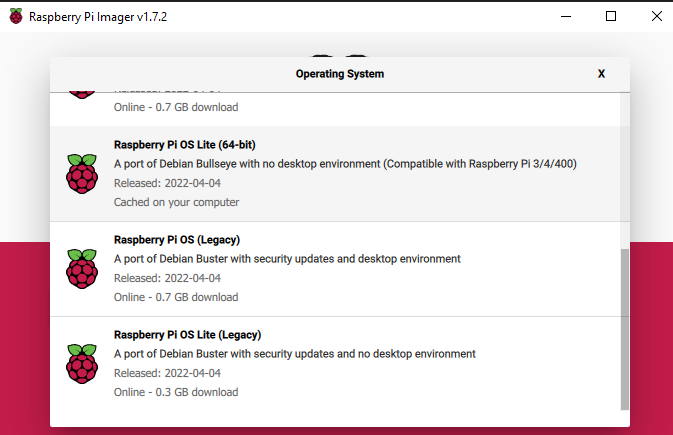
2. Select the SD card as Storage device
3. Define the hostname and enable SSH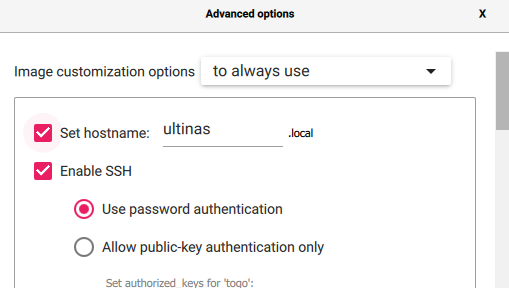
4. Enter your credentials which you want to login later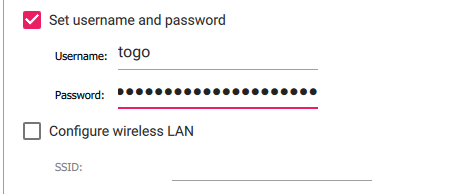
5. If you are not via LAN connected you can configure the Wifi as well in the setting.
6. Execute it! After that stick the SD card into the Raspberry Pi and power it on.
Connect via SSH
Windows
Download https://www.advanced-ip-scanner.com/de/ and scan your network. You'll see the IP address and hostname.
Connect with putty https://www.putty.org/ or use WSL (Windows Subsystem for Linux) https://docs.microsoft.com/de-de/windows/wsl/install
Enter ssh username@192.168.1.222 and provide your password
MAC / Linux
Open the terminal and scan the network with NMAP.
nmap -sn 192.168.1.0/24Then enter ssh username@192.168.1.222 and provide your password
Install OMV
First of all make sure your Raspi is updated and upgraded.
sudo apt update

sudo apt upgrade
Afterwards download the OMV install script.
wget -O - https://raw.githubusercontent.com/OpenMediaVault-Plugin-Developers/installScript/master/install | sudo bashThe installation takes a while. To make sure your files were downloaded enter following:
dpkg -l | grep openme
That was it already now enter the IP of your Raspberry Pi in your browser.
No Comments