
Commands
man
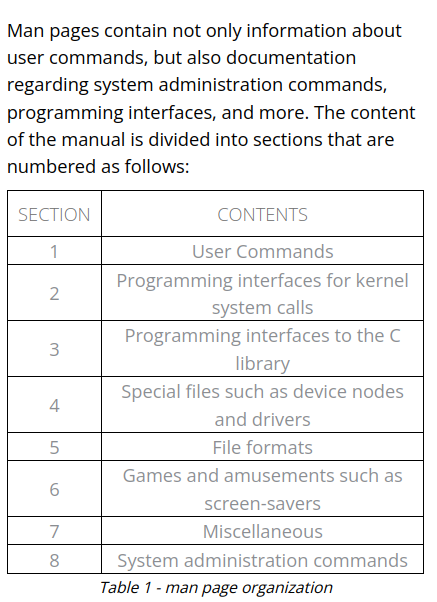
However, if we use the -k option with man, we can perform a keyword search as shown below:
man -k passwd
We can further narrow the search with the help of a regular expression:
man -k '^passwd$'
apropos
With the apropos3 command, we can search the list of man page descriptions for a possible match based on a keyword. Although this is a bit crude, it's often helpful for finding a particular command based on the description. Let's take a look at an example. Suppose that we want to partition a hard drive but can't remember the name of the command. We can figure this out with an apropos search for "partition".
apropos partition
which
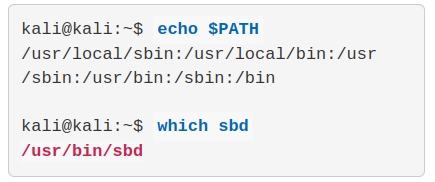
The which command1 searches through the directories that are defined in the $PATH environment variable for a given file name. This variable contains a listing of directories that Kali searches when a command is issued without its path. If a match is found, which returns the full path to the file as shown below:
locate
The locate command2 is the quickest way to find the locations of files and directories in Kali. In order to provide a much shorter search time, locate searches a built-in database named locate.db rather than the entire hard disk itself. This database is automatically updated on a regular basis by the cron scheduler. To manually update the locate.db database, you can use the updatedb command.
find
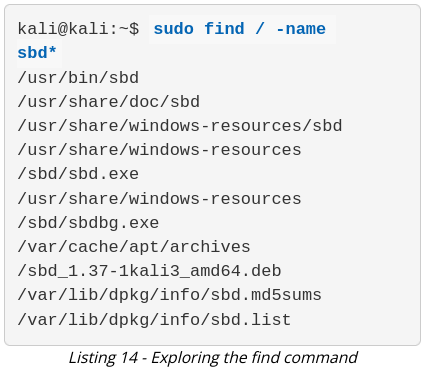
The find command3 is the most complex and flexible search tool among the three. Mastering its syntax can sometimes be tricky, but its capabilities go beyond a normal file search. The most basic usage of the find command is shown in Listing 14, where we perform a recursive search starting from the root file system directory and look for any file that starts with the letters "sbd".
No Comments